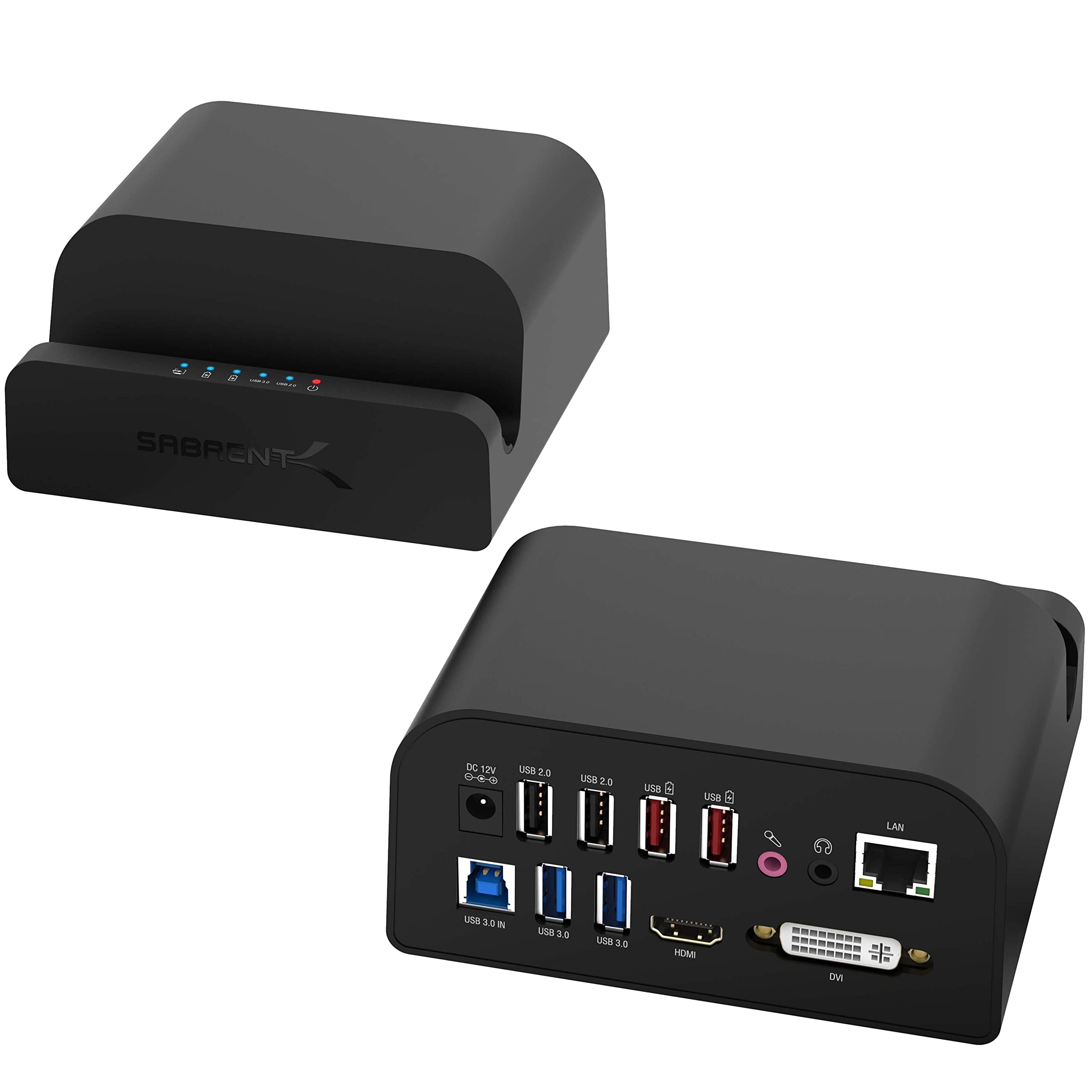
The SABRENT USB 3.0 Universal Docking Station review centers on a desk-oriented dock that combines display connections, wired networking, audio, and USB expansion in one unit.
Its mix of HDMI and DVI outputs, Gigabit Ethernet, and two charging ports may suit a laptop setup that needs more than a basic USB hub.
SABRENT Universal Dock Review Summary
The quick verdict
1,000+ ratings
Read Amazon ReviewsSABRENT USB 3.0 Universal Docking Station (DS-RICA)
A versatile choice for laptop users who want dual-display connections, wired networking, audio jacks, and several USB ports at one desk.
- Supports simultaneous HDMI and DVI displays.
- Includes two USB 3.0 and two USB 2.0 ports; the described maximum transfer rates are up to 5Gbps and 480Mbps respectively.
- Provides a 10/100/1000 Gigabit Ethernet port for wired networking.
- Has speaker and microphone jacks for audio connections.

Pros
- Combines dual-display connections, wired Ethernet, audio, and USB ports in one desk accessory.
- HDMI and DVI support can help accommodate monitors with different input types.
Consider before buying
- Display support depends on the computer’s operating system and compatible DisplayLink software, so setup compatibility deserves a check before purchase.
- The four USB data ports may feel limiting if your desk has many wired peripherals.
Read the full review summary
The DS-RICA is designed to make a laptop workstation easier to connect: it supports simultaneous HDMI and DVI displays, adds a Gigabit Ethernet port and speaker and microphone jacks, and provides two USB 3.0 plus two USB 2.0 ports.
Two additional 2.4A charging ports make it useful when a phone or other device also needs a place to charge at the desk.
This is a better fit for a fixed workspace with a mix of display, network, audio, and USB needs than for someone seeking a compact travel hub.
The display feature is especially relevant if your monitors use HDMI and DVI, but buyers should check the dock’s operating-system and DisplayLink driver requirements against their computer before relying on it.
The buying factors
SABRENT Universal Dock Scorecard
Editorial scores reflect listed features and buyer fit; they are not laboratory measurements or customer ratings.
Display connectivity
Simultaneous HDMI and DVI outputs give a multi-display setup flexibility, subject to host and driver compatibility.
USB expansion
Two USB 3.0 and two USB 2.0 ports support a practical mix of peripherals, though this is not a large port array.
Wired networking
The Gigabit Ethernet port offers a wired connection option for a compatible setup.
Audio access
Separate speaker and microphone jacks are convenient for peripherals that use those connections.
Device charging
Two 2.4A charging ports add useful charging capacity, while the description does not establish laptop power delivery.
Setup compatibility
The broad docking feature set is useful, but buyers should verify current OS and DisplayLink driver support for their exact computer.
Key Features and Specifications of SABRENT Universal Dock
- Supports simultaneous HDMI and DVI displays.
- Includes two USB 3.0 and two USB 2.0 ports; the described maximum transfer rates are up to 5Gbps and 480Mbps respectively.
- Provides a 10/100/1000 Gigabit Ethernet port for wired networking.
- Has speaker and microphone jacks for audio connections.
- Includes two 2.4A fast-charging ports for compatible devices.
- Designed as a universal docking station with a stand for tablets and laptops.
Pros and Cons of SABRENT Universal Dock
Pros
- Combines dual-display connections, wired Ethernet, audio, and USB ports in one desk accessory.
- HDMI and DVI support can help accommodate monitors with different input types.
- USB 3.0 and USB 2.0 ports provide options for peripherals with differing speed needs.
- Two dedicated 2.4A charging ports can keep other devices charging alongside the computer setup.
Consider before buying
- Display support depends on the computer’s operating system and compatible DisplayLink software, so setup compatibility deserves a check before purchase.
- The four USB data ports may feel limiting if your desk has many wired peripherals.
- The description does not specify laptop charging through the dock, so buyers who want one-cable laptop power should confirm that requirement separately.
Who Should Buy SABRENT Universal Dock?
Good fit
Consider the DS-RICA if you want to consolidate several desk connections and your setup benefits from HDMI and DVI display outputs, wired networking, and separate speaker and microphone jacks.
It is most compelling when those features replace several individual adapters or make a fixed workstation easier to connect.
It may also suit a household or shared desk where USB accessories and personal devices need to connect or charge in the same area.
Before choosing it, confirm that your computer supports the dock’s DisplayLink setup and that its display connections match the monitors you plan to use.
Who should skip it
Look elsewhere if you need a compact hub for travel, a large bank of USB ports, or guaranteed laptop charging from the dock itself. Those needs are not established by the described feature set.
If your workflow depends on multiple extended displays, verify that the current driver and your operating system support the arrangement you need before making the dock central to your workstation.
What the SABRENT Universal Dock Means for Your Desk
Dual displays and driver fit
The HDMI and DVI outputs are the defining feature for users building a two-monitor workspace.
Because this docking approach uses DisplayLink, the practical question is whether your computer’s operating system and driver support the display arrangement you want; check compatibility before depending on both outputs for daily work.
A useful mix of connections
Gigabit Ethernet, speaker and microphone jacks, and four USB data ports cover common desk needs without requiring a separate adapter for each connection.
The two USB 3.0 ports are the choice for devices where higher transfer rates matter, while USB 2.0 can serve many keyboards, mice, and similar accessories.
Charging and setup expectations
The two 2.4A charging ports add a practical convenience for compatible devices, but they do not establish that the dock powers a laptop.
If reducing power adapters is a priority, check the computer’s charging needs and confirm whether the dock meets them before buying.
Choose around the workstation you have
This dock’s value depends on the equipment already on your desk: monitor inputs, wired-network access, audio peripherals, and the number of USB devices all matter.
Listing those connections first makes it easier to decide whether the DS-RICA consolidates enough of your setup to justify a dedicated docking station.
Alternatives to SABRENT Universal Dock
Laptop Docking Stations alternative
1,000+ ratings
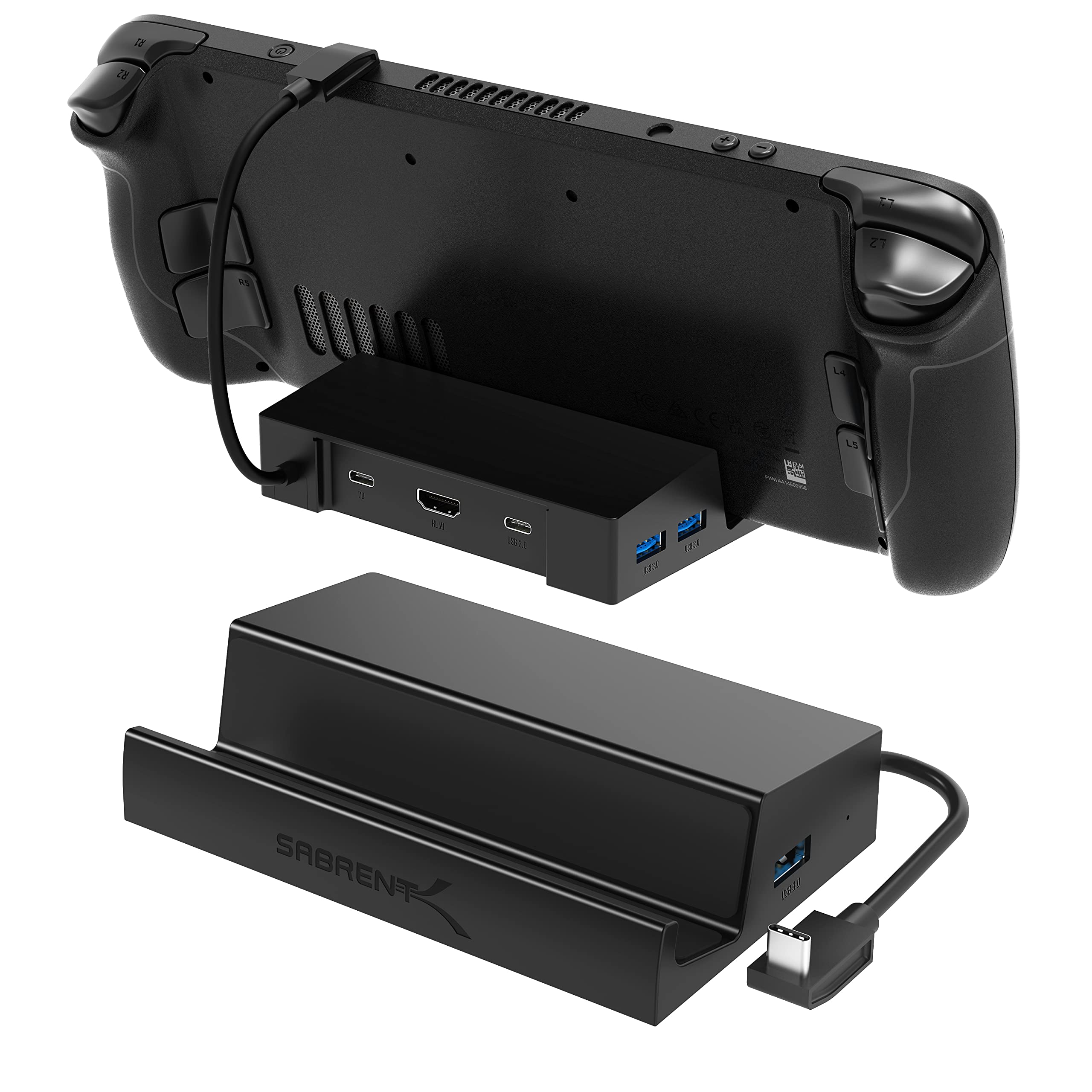
Read Amazon ReviewsSABRENT 6-Port USB-C Dock for Steam Deck & ROG Ally (DS-SD6P)
Choose the DS-RICA when dual HDMI-and-DVI display connections, wired networking, and audio jacks matter.
The DS-SD6P is a better fit for a compatible USB-C handheld or laptop setup where compact size and device charging are priorities and Ethernet is unnecessary.
- The DS-SD6P is a compact USB-C dock with up to 95W PD3.0 charging, HDMI output up to 4K at 60Hz on compatible devices, three USB-A ports, and an additional USB-C data port.
- It does not include Ethernet.
- The DS-RICA offers HDMI and DVI display outputs, Gigabit Ethernet, audio jacks, and USB 3.0 and USB 2.0 ports, with a stand-oriented desk setup.
Laptop Docking Stations alternative
60+ ratings
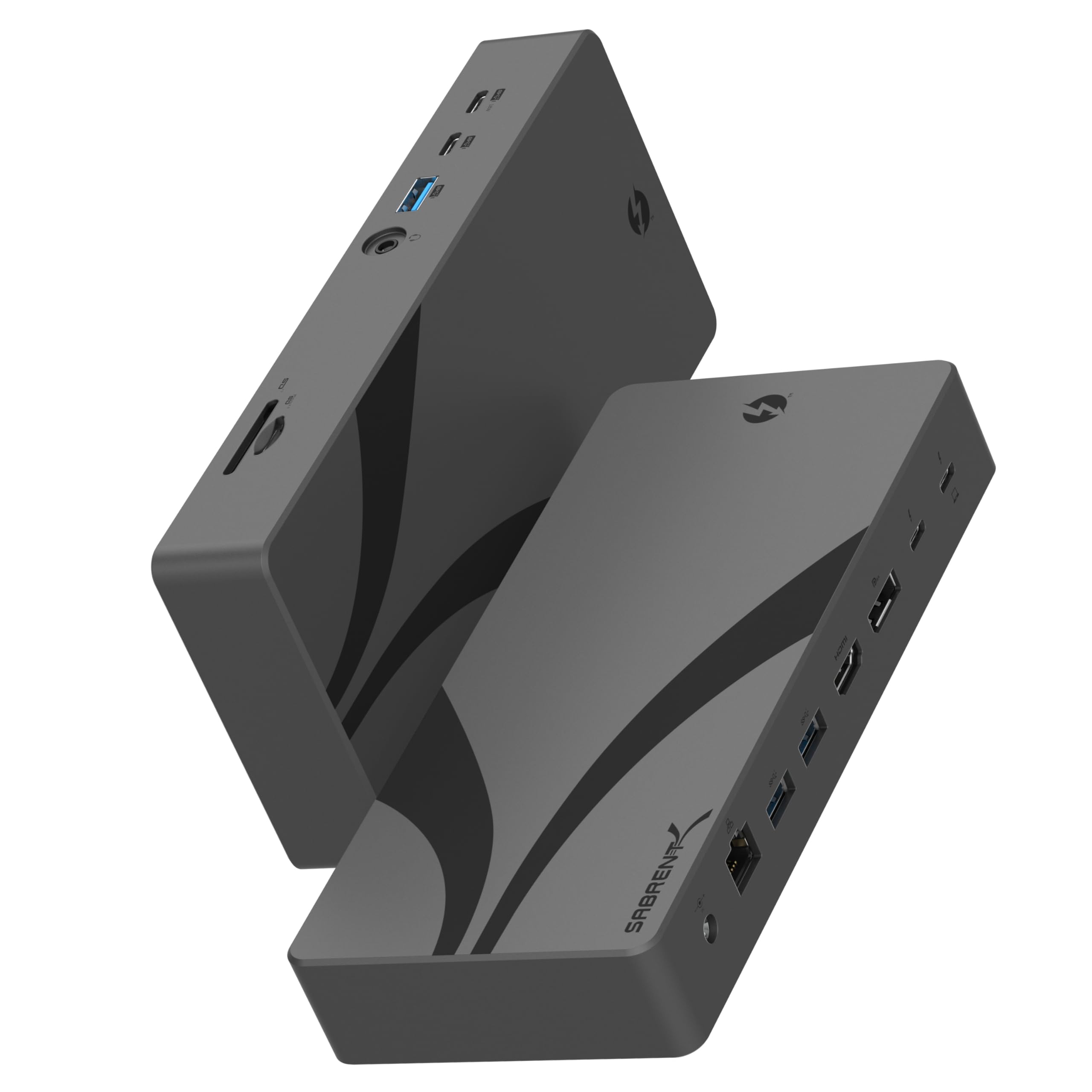
Read Amazon ReviewsSABRENT Thunderbolt 4 Docking Station (DS-T4MF)
The DS-T4MF may suit a buyer whose computer supports Thunderbolt or USB4 and who wants a broader, higher-speed connection set with card readers.
The DS-RICA is the simpler match when HDMI and DVI, Ethernet, audio, and basic USB expansion are the main desk requirements.
- The DS-T4MF is a Thunderbolt 4 dock with USB4 and Thunderbolt 3 compatibility, multiple display outputs, Gigabit Ethernet, audio, card readers, and several USB ports with transfer speeds up to 10Gbps on three ports.
- The DS-RICA focuses on HDMI and DVI displays, Gigabit Ethernet, audio jacks, and a smaller set of USB ports.
Is SABRENT Universal Dock Worth It?
The SABRENT USB 3.0 Universal Docking Station is worth considering for a fixed workstation that needs HDMI and DVI display connections alongside wired networking, audio jacks, USB expansion, and device charging.
Its variety of connections is the strongest reason to choose it.
Buy only after checking that your computer and operating system support the DisplayLink setup you need, and do not assume the dock charges a laptop.
If those points align with your setup, the DS-RICA offers a practical way to bring several desk connections together.
Your review at a glance
1,000+ ratings
Read Amazon ReviewsSABRENT USB 3.0 Universal Docking Station (DS-RICA)
A versatile choice for laptop users who want dual-display connections, wired networking, audio jacks, and several USB ports at one desk.
- Supports simultaneous HDMI and DVI displays.
- Includes two USB 3.0 and two USB 2.0 ports; the described maximum transfer rates are up to 5Gbps and 480Mbps respectively.
- Provides a 10/100/1000 Gigabit Ethernet port for wired networking.
- Has speaker and microphone jacks for audio connections.